
Blog · · By Dhrumil Barot, Founder
How to Use OpenAI Batch API in Python (With Cost Math)
Use the OpenAI Batch API by writing a JSONL file, uploading it, creating a 24h batch and joining results on custom_id. Python code, limits, 50% math.
TL;DR: To use the OpenAI Batch API, write one request per line to a JSONL file with a unique custom_id, upload it with purpose="batch", call client.batches.create(..., completion_window="24h"), poll until the status is completed, then download output_file_id and join results on custom_id. Every token costs 50% of the standard price, and the batch must finish within 24 hours. One batch holds up to 50,000 requests and 200 MB.
How to use OpenAI Batch API in one paragraph: you trade latency for half-price tokens. You build a .jsonl file where each line is a full API request (custom_id, method, url, body), upload it through the Files API, create a batch that points at one endpoint such as /v1/responses, and come back later for an output file. On 100,000 support tickets classified with gpt-6.1-terra, that is $80.00 instead of $160.00 at list prices checked on 2026-11-12. Below is a complete OpenAI Batch API Python example that also handles the parts the short tutorials skip: splitting files at the 50,000-line cap, results that come back out of order, the error file, and retries.
What do you need before you start?
You need four things:
- An OpenAI API key with billing enabled, exported as
OPENAI_API_KEY. - The official Python SDK:
pip install --upgrade openai. The code below usesclient.files,client.batchesand the Responses API body format. - A model that supports Batch. The Batch API guide says most models do; the Batch tab on the pricing page lists the rate for each one.
- A job that can wait. The only completion window is
24h. If a user is waiting on the answer, Batch is the wrong tool.
The examples use gpt-6-luna because it is the cheapest current model with a Batch rate ($0.05 per 1M input tokens, $0.25 per 1M output). Swap the model name for any other one; every line in a file must use the same model.
How to use OpenAI Batch API: the 6 steps
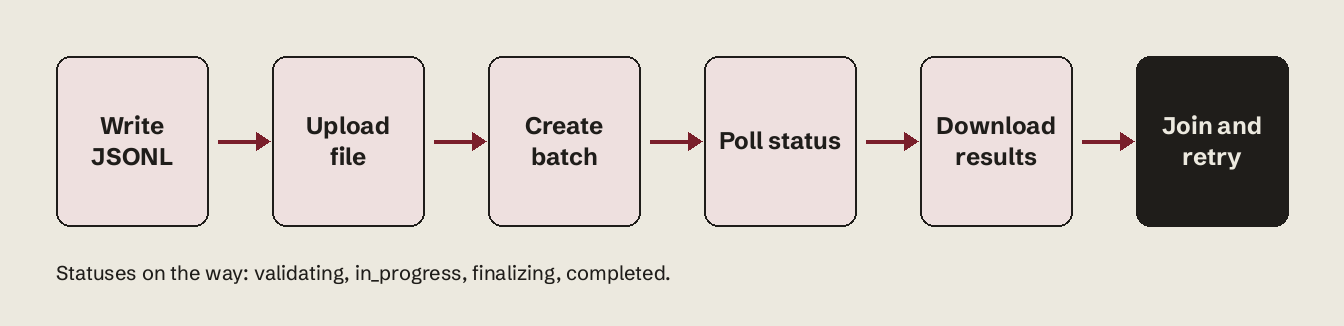
The whole lifecycle is six calls:
- Write the requests to a JSONL file, one request per line, each with a unique
custom_id. - Upload the file with
client.files.create(..., purpose="batch"). - Create the batch with
client.batches.create(...)andcompletion_window="24h". - Poll
client.batches.retrieve(batch_id)until the status is terminal. - Download
output_file_idanderror_file_idand join the results oncustom_id. - Resubmit the failed and expired requests as a new, smaller batch.
Step 1: Write the JSONL file
Each line is one request. The body takes exactly the parameters the endpoint takes synchronously. This example classifies support tickets with the Responses API:
import json

INSTRUCTIONS = (
    "Classify the support ticket as one of: billing, bug, feature_request, other. "
    "Reply with the label only."
)

def build_lines(tickets, model="gpt-6-luna"):
    for t in tickets:
        yield {
            "custom_id": f"ticket-{t['id']}",
            "method": "POST",
            "url": "/v1/responses",
            "body": {
                "model": model,
                "instructions": INSTRUCTIONS,
                "input": t["text"],
                "reasoning": {"effort": "none"},
                "max_output_tokens": 64,
            },
        }
One batch can hold 50,000 requests and 200 MB, so split large jobs before uploading. This writer starts a new file at either limit and refuses duplicate IDs, the most common validation failure:
MAX_LINES = 50_000
MAX_BYTES = 190 * 1024 * 1024  # headroom under the 200 MB cap

def write_chunks(lines, prefix="batch_input"):
    paths, seen, f, n, size = [], set(), None, 0, 0
    for line in lines:
        if line["custom_id"] in seen:
            raise ValueError(f"duplicate custom_id {line['custom_id']}")
        seen.add(line["custom_id"])
        data = (json.dumps(line) + "\n").encode()
        if f is None or n == MAX_LINES or size + len(data) > MAX_BYTES:
            if f:
                f.close()
            paths.append(f"{prefix}_{len(paths):03d}.jsonl")
            f, n, size = open(paths[-1], "wb"), 0, 0
        f.write(data)
        n, size = n + 1, size + len(data)
    if f:
        f.close()
    return paths
A finished line looks like this:
{"custom_id": "ticket-1042", "method": "POST", "url": "/v1/responses", "body": {"model": "gpt-6-luna", "instructions": "Classify the support ticket ...", "input": "I was charged twice this month.", "reasoning": {"effort": "none"}, "max_output_tokens": 64}}Put the long, identical part of the prompt (instructions) first and the unique part last. That keeps the prefix cacheable, which matters for cost (see the cost section).
Step 2: Upload the file
from openai import OpenAI

client = OpenAI()

uploaded = client.files.create(file=open("batch_input_000.jsonl", "rb"), purpose="batch")
print(uploaded.id)  # file-...
The purpose must be batch; a file uploaded for fine-tuning or assistants can't start a batch.
Step 3: Create the batch
This is the call that creates a batch with the OpenAI API. It takes the uploaded file's ID and returns a Batch object with status validating:
batch = client.batches.create(
    input_file_id=uploaded.id,
    endpoint="/v1/responses",
    completion_window="24h",
    metadata={"job": "ticket-triage", "chunk": "000"},
    output_expires_after={"anchor": "created_at", "seconds": 7 * 24 * 3600},
)
print(batch.id, batch.status)  # batch_... validating
Three details from the API reference:
endpointmust match theurlon every line. Supported:/v1/responses,/v1/chat/completions,/v1/embeddings,/v1/completions,/v1/moderations,/v1/images/generations,/v1/images/editsand/v1/videos.metadatatakes up to 16 key-value pairs (keys up to 64 characters, values up to 512). Tag every batch with the job and chunk: it is how you find it inbatches.list()a week later.output_expires_aftersets how long the output and error files live, from 3,600 seconds (1 hour) to 2,592,000 seconds (30 days). The default is 30 days. The clock starts at the output file's creation, not at batch creation.
Step 4: Poll until it finishes
import time

TERMINAL = {"completed", "failed", "expired", "cancelled"}

def wait(batch_id, every=60):
    while True:
        b = client.batches.retrieve(batch_id)
        c = b.request_counts
        if c:
            print(f"{b.status}: {c.completed}/{c.total} done, {c.failed} failed")
        if b.status in TERMINAL:
            return b
        time.sleep(every)

batch = wait(batch.id)
A batch moves through validating, in_progress and finalizing to completed. It ends in failed when the input file fails validation, expired when the 24 hours run out, and cancelled after client.batches.cancel(batch_id) (the cancelling state can take up to 10 minutes while in-flight requests finish). Polling once a minute is plenty. For many batches, OpenAI webhooks can notify your server when a batch completes instead.
Step 5: Download the results and join on custom_id
def read_jsonl(file_id):
    if not file_id:
        return []
    text = client.files.content(file_id).text
    return [json.loads(line) for line in text.splitlines() if line.strip()]

def output_text(body):
    return "".join(
        part["text"]
        for item in body.get("output", []) if item.get("type") == "message"
        for part in item.get("content", []) if part.get("type") == "output_text"
    )

if batch.status == "failed":
    for e in batch.errors.data:
        print(e.line, e.code, e.message)

results, failed = {}, {}
for row in read_jsonl(batch.output_file_id):
    resp = row["response"]
    if resp and resp["status_code"] == 200:
        results[row["custom_id"]] = output_text(resp["body"])
    else:
        failed[row["custom_id"]] = resp["body"] if resp else row["error"]
for row in read_jsonl(batch.error_file_id):
    failed[row["custom_id"]] = row["error"]

print(len(results), "ok,", len(failed), "failed")
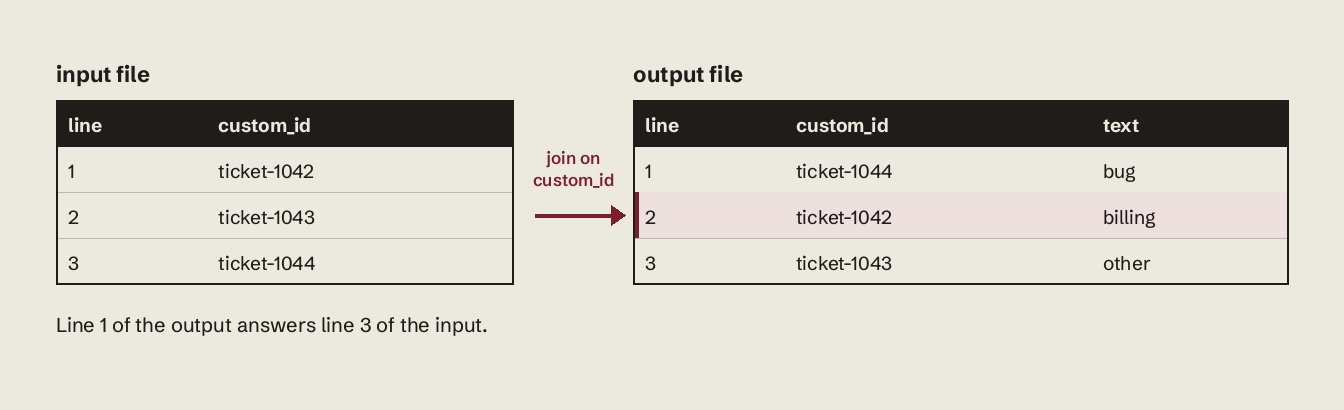
The output file's line order may not match the input order. Never zip the two files together; always join on custom_id. For Chat Completions batches, read body["choices"][0]["message"]["content"] instead of output_text.
Step 6: Retry what failed
Keep the original lines in a dict, then resubmit only the failures:
lines = {l["custom_id"]: l for l in build_lines(tickets)}
retry = [lines[cid] for cid in failed]
if retry:
    for path in write_chunks(retry, prefix="batch_retry"):
        f = client.files.create(file=open(path, "rb"), purpose="batch")
        client.batches.create(input_file_id=f.id, endpoint="/v1/responses",
                              completion_window="24h", metadata={"job": "ticket-triage-retry"})
Check the error codes first. A batch_expired line will usually succeed on resubmission; a 400 from a bad parameter will fail the same way again.
How do you verify the batch worked?
Three checks before you trust the output:
batch.request_counts.totalequals the number of lines you wrote, andcompleted + failedequalstotal.len(results) + len(failed)equals the number of lines, with nocustom_idmissing from both.batch.usagereports the input and output tokens. Multiply them by the Batch rate for your model and compare with the line on your usage dashboard.
Run a 5 to 10 line batch first. It validates the JSONL shape, the model name and your parsing code for a fraction of a cent.
How much cheaper is the Batch API?
The Batch API costs 50% of the standard price. For the models below that holds for input, output and cached input alike. Prices below are per 1M tokens from OpenAI's pricing page, verified 2026-11-12:
| Model | Standard input / output | Batch input / output | Batch cached input |
|---|---|---|---|
| gpt-6-luna | $0.10 / $0.50 | $0.05 / $0.25 | $0.005 |
| gpt-6.1-terra | $1.00 / $5.00 | $0.50 / $2.50 | $0.025 |
| gpt-6.1-sol | $2.00 / $10.00 | $1.00 / $5.00 | $0.05 |
| gpt-6-astra | $10.00 / $50.00 | $5.00 / $25.00 | $0.50 |
Per-token prices hide the real number, so here is one job priced per task. Assumptions, all editable: 100,000 support tickets, each request 1,500 input tokens (1,200 tokens of shared instructions and examples plus 300 tokens of ticket) and 20 output tokens. That is 150M input tokens and 2M output tokens.
| Model | Standard total | Batch total | Batch cost per ticket |
|---|---|---|---|
| gpt-6-luna | 150 x $0.10 + 2 x $0.50 = $16.00 | $7.50 + $0.50 = $8.00 | $0.00008 |
| gpt-6.1-terra | 150 x $1.00 + 2 x $5.00 = $160.00 | $75.00 + $5.00 = $80.00 | $0.0008 |
| gpt-6.1-sol | 150 x $2.00 + 2 x $10.00 = $320.00 | $150.00 + $10.00 = $160.00 | $0.0016 |
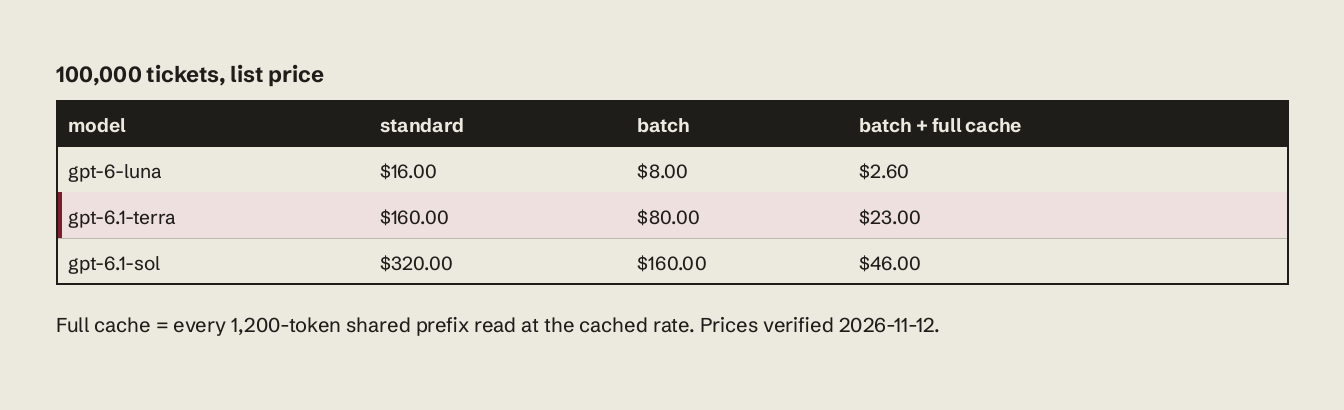
Prompt caching stacks on top. The Batch tab prices cached input at half the standard cached rate ($0.025 per 1M on gpt-6.1-terra). If every request read its 1,200-token shared prefix from cache, the gpt-6.1-terra job would cost 120 x $0.025 + 30 x $0.50 + 2 x $2.50 = $23.00, 86% less than the $160.00 standard run. Treat that as the ceiling, not the forecast: cache hits are not guaranteed, the prefix must be at least 1,024 tokens on GPT-5.6 and later models, and a cache write is billed at 1.25x the input rate per the prompt caching guide. We worked through when caching pays in prompt caching break-even. To price your own token counts, use the LLM cost calculator.
What are the batch file and token limits?
The limits that bite, from the Batch API guide and the rate limits guide:
| Limit | Value |
|---|---|
| Requests per batch | 50,000 |
| Input file size | 200 MB |
| Embedding inputs per /v1/embeddings batch | 50,000 across all requests |
| Models per input file | 1 |
| Batches created per hour | 2,000 |
| Queued prompt tokens per model | Set by your usage tier (Settings > Organization > Limits) |
| Output tokens | No limit |
| Output file lifetime | 30 days by default, 1 hour to 30 days with output_expires_after |
Two of these catch people:
- The enqueued token limit is per model and counts every pending batch. Input tokens of all batches that haven't completed count against it. Once a batch completes, its tokens stop counting. If you split a big job into 20 files, submit them a few at a time instead of all at once.
- Batch traffic does not use your normal rate limits. It draws from a separate pool, so a large batch won't throttle your live traffic. Some tutorials still claim there is "no separate rate limit tier"; the official guide says the opposite.
How long do batches take?
Every batch completes within 24 hours, and OpenAI's guide says "often more quickly". There is no faster window to pay for: 24h is the only accepted value. Small jobs usually come back well inside the window, but the docs promise only the 24 hours, so build the downstream step to tolerate all of it.
When the window runs out, the batch moves to expired. Completed requests are delivered in the output file and billed. Unfinished ones are cancelled and written to the error file:
{"id": "batch_req_123", "custom_id": "request-3", "response": null, "error": {"code": "batch_expired", "message": "This request could not be executed before the completion window expired."}}That is why Step 6 exists: resubmit the expired custom_ids as a new batch.
Common errors and fixes
| Error | Where you see it | Fix |
|---|---|---|
| "The custom_id for this request is a duplicate of another request. The custom_id parameter must be unique for each request in a batch." | batch.errors, status failed | Make IDs unique within the file. Reusing an ID across different batches is fine. |
| token_limit_exceeded: "Enqueued token limit reached for (model) in organization (org). Limit: (n) enqueued tokens. Please try again once some in_progress batches have been completed." | batch.errors, status failed | Split the file, submit fewer batches at once, or raise your tier. See the note below the table. |
| batch_expired | Error file | Resubmit those lines. |
| Lines fail with a 400 | Output file, status_code 400 | The body has a parameter the endpoint rejects. Run the same body synchronously once to see the message. |
| Batch fails at validation | batch.errors | Check that every line is valid JSON, every line uses the same model, and each url matches the endpoint you passed. |
Users on the OpenAI developer forum report the enqueued token error even with no batches running; waiting about an hour cleared it for some of them.
Batch API vs Flex processing vs standard calls
Flex processing gives the same per-token price as Batch without a JSONL file. You add service_tier="flex" to a normal Responses or Chat Completions call and get a slower response. Per the Flex guide, Flex is in beta on a limited set of models, can return 429 Resource Unavailable (not charged), and needs a longer client timeout than the SDK's 10-minute default.
| Standard | Flex | Batch API | |
|---|---|---|---|
| Price | List | Batch rates | 50% of list |
| Response | Seconds | Slower, synchronous | Within 24 hours |
| Code change | None | service_tier="flex" plus a longer timeout | JSONL, upload, poll, download |
| Rate limits | Standard pool | Standard pool | Separate batch pool |
| Best for | Users waiting | Background jobs that need one answer at a time | 1,000+ requests, evals, backfills, embeddings |
Use Batch when the job is large and fixed up front. Use Flex when requests arrive one at a time but nobody is waiting. For how OpenAI's batch discount compares with Anthropic's, see our Batch API comparison of OpenAI and Anthropic; full model prices are in our OpenAI API pricing guide.
When should you not use the Batch API?
Skip it in four cases:
- A user is waiting. Chat, autocomplete and agents in a loop need synchronous calls.
- The job is small. Ten requests save cents and add polling code. A sensible floor is a few hundred requests or a job you rerun often.
- Each step depends on the previous answer. A batch has no shared state between lines; a multi-step agent is a workflow, not a batch.
- You need mixed models in one job. One model per file; split the job by model.
The synchronous traffic that remains is usually the larger part of the bill. If you would rather not hand-pick a model for each of those calls, Vynaris is an OpenAI-compatible endpoint (https://api.vynaris.com/v1) that routes each request to a cheaper model only when eval evidence says it can handle the task, and bills provider list price plus 3% on the first $500 a month and 1% after. The Batch code above does not need it. For the Responses API body format used throughout, see OpenAI Responses API structured outputs.
FAQ
Does the Batch API work with the Responses API?
Yes. /v1/responses is a supported batch endpoint, and OpenAI's own examples now use it. Set "url": "/v1/responses" on every line and pass endpoint="/v1/responses" when creating the batch. Read the text from response.body.output, not from choices.
Can I use different models in one batch?
No. Each input file can only include requests to a single model. Split a mixed job into one file per model and create one batch for each.
Does prompt caching work with the Batch API?
Yes, and the discounts stack: the Batch tab of the pricing page lists cached-input rates at half the standard cached rate, for example $0.025 per 1M tokens on gpt-6.1-terra. Hits are not guaranteed, so put the identical instructions at the start of every request and budget at the uncached batch rate.
Does the Batch API count against my rate limits?
No. Batch uses a separate pool with its own queued-token limit per model, so it does not consume your standard per-model limits. The batch limit itself counts the input tokens of every batch that hasn't completed.
Can I cancel a batch?
Yes: client.batches.cancel(batch_id). The batch sits in cancelling for up to 10 minutes while in-flight requests finish, then moves to cancelled. Before you resubmit, check request_counts.completed and the output file, so you don't pay twice for lines that already ran.
How long are batch results kept?
Output and error files expire 30 days after they are created by default. Set output_expires_after when creating the batch to choose anything from 1 hour to 30 days. Download and store the results in your own system before then.
Related articles
- Batch APIs: OpenAI vs Anthropic 50% off and when 24h latency is free
- OpenAI Responses API Structured Outputs: Working Code
- OpenAI Whisper API Pricing: $0.006/min and Its Replacement
- What a meeting summarizer costs per meeting-hour: the 42x spread the Batch API halves and caching can't touch
- OpenAI-compatible APIs: what one base_url swap gets you, and the 3.5x caching tax
- Healthcare Claims AI Cost: $34 to $343 per 1,000 Claim Packets with Batch