
Blog · · By Dhrumil Barot, Founder
OpenAI Responses API Structured Outputs: Working Code
Use text.format with type json_schema and strict true in the Responses API. Working code, strict mode schema rules, common errors and token cost.
TL;DR: In the Responses API, structured outputs move from response_format to text.format. Send text: {format: {type: "json_schema", name, schema, strict: true}}, or call client.responses.parse(text_format=YourModel) in Python. Strict mode rejects schemas with optional fields, missing additionalProperties: false, or a root anyOf, and the JSON keys you ask for are billed as output tokens.
To get OpenAI Responses API structured outputs, put a JSON Schema under text.format with type: "json_schema" and strict: true; the model's reply is then constrained to that schema. Structured outputs in the Responses API work on gpt-4o-mini, gpt-4o-2024-08-06 and every later model, and OpenAI's docs point new projects at gpt-6-astra (OpenAI Structured Outputs guide). The Python and JavaScript SDKs accept Pydantic and Zod models and convert them for you. The steps below give a working request, the edge cases you must handle, the schema features strict mode refuses, and what the feature does to your bill. Prices verified 2026-11-05.
What you need
- An OpenAI API key in
OPENAI_API_KEY. - The current
openaiPython SDK (pip install -U openai pydantic) or the Node SDK withzod. - A model from
gpt-4o-minionward. Older models such asgpt-4-turboonly support JSON mode. - A schema that fits the strict subset (rules in the section on unsupported features).
How do I use structured outputs with the Responses API?
Follow these steps. Each one is a single change you can test on its own.
- Define the schema as a Pydantic model. Every field is required by default, which is what strict mode wants.
from openai import OpenAI
from pydantic import BaseModel

client = OpenAI()

class Invoice(BaseModel):
    vendor: str
    invoice_date: str
    total_usd: float
line_items: list[str]- Call `responses.parse` with `text_format`. The SDK builds the JSON Schema, sets
strict: trueand parses the reply.
response = client.responses.parse(
    model="gpt-6-luna",
    input=[
        {"role": "system", "content": "Extract the invoice fields."},
        {"role": "user", "content": "ACME Corp, 2026-10-30: 3 widgets, 1 bracket. Total $412.50"},
    ],
    text_format=Invoice,
    max_output_tokens=1024,
)
invoice = response.output_parsed  # an Invoice instance
print(invoice.total_usd)- Or send raw JSON Schema with `responses.create`. Use this from other languages, from curl, or when the schema lives in a config file.
schema = {
    "type": "object",
    "properties": {
        "vendor": {"type": "string"},
        "invoice_date": {"type": "string", "format": "date"},
        "total_usd": {"type": "number", "minimum": 0},
        "po_number": {"type": ["string", "null"]},
    },
    "required": ["vendor", "invoice_date", "total_usd", "po_number"],
    "additionalProperties": False,
}

response = client.responses.create(
    model="gpt-6-luna",
    input="ACME Corp, 2026-10-30, total $412.50, no PO.",
    text={"format": {"type": "json_schema", "name": "invoice", "schema": schema, "strict": True}},
    max_output_tokens=1024,
)
print(response.output_text)
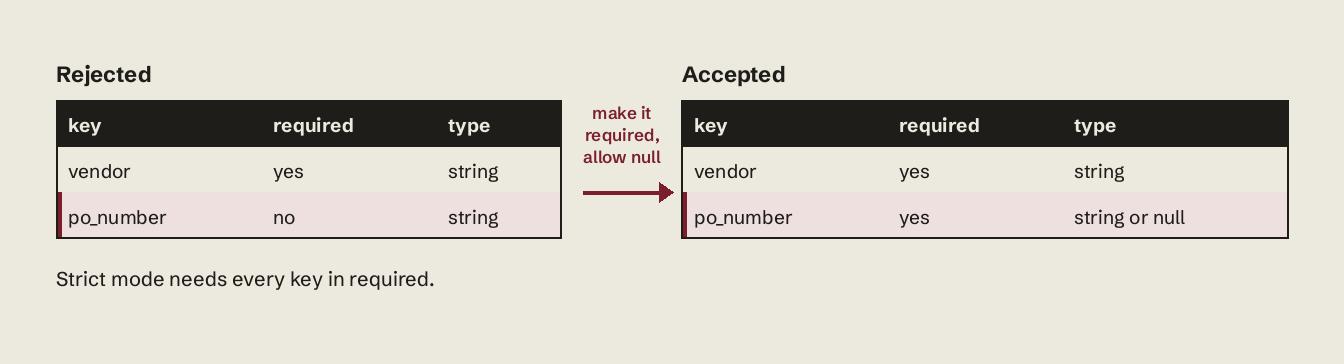
Note po_number: an optional field is written as a required field whose type allows null.
- Check for incomplete output and refusals before parsing. A response cut off by
max_output_tokensis not valid JSON, and a safety refusal comes back as arefusalcontent item instead ofoutput_text.
import json

if response.status == "incomplete" and response.incomplete_details.reason == "max_output_tokens":
    raise RuntimeError("Output truncated: raise max_output_tokens or shrink the schema")

message = next(item for item in response.output if item.type == "message")
part = message.content[0]
if part.type == "refusal":
    print("Refused:", part.refusal)
else:
data = json.loads(part.text)- Stream if you need it. Structured outputs stream like any other Responses call; the JSON arrives in schema key order, because the model writes keys in the order your schema lists them.
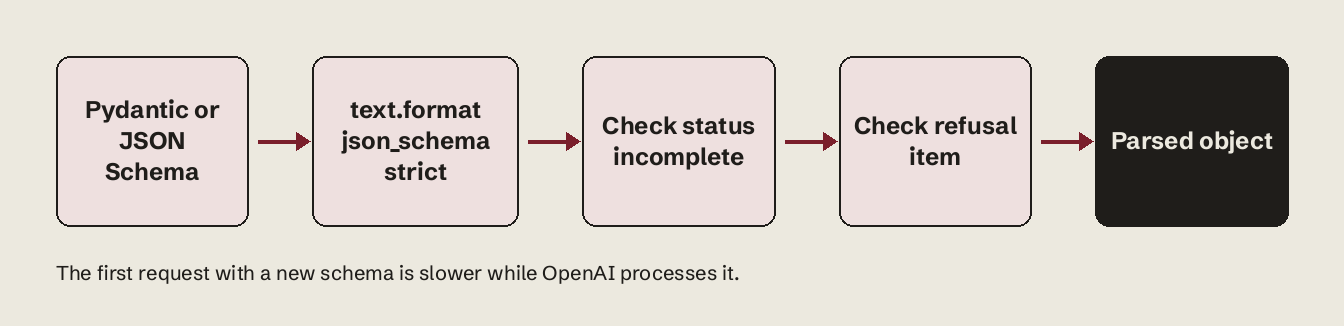
The request flow, end to end:
How do I verify it worked?
Print response.output_parsed (Python parse) or run json.loads(response.output_text) and validate it against the same Pydantic model with Invoice.model_validate_json(response.output_text). If validation passes on a few hundred real inputs and you see no refusal items, the integration is done. Expect the first call with a new schema to be slower: OpenAI's guide says the API processes the schema on first use, and later requests with the same schema have no extra latency.
How is text.format different from response_format in Chat Completions?
text.format is the same feature with a flatter shape. The migration guide lists it as one of the API-shape changes.
| Chat Completions | Responses API | |
|---|---|---|
| Parameter | response_format | text.format |
| Schema nesting | {"type": "json_schema", "json_schema": {"name", "strict", "schema"}} | {"type": "json_schema", "name", "strict", "schema"} |
| JSON mode | {"type": "json_object"} | text.format: {"type": "json_object"} |
| Python helper | chat.completions.parse(response_format=Model) | responses.parse(text_format=Model) |
| Read result | choices[0].message.content | output_text or output_parsed |
| Truncation signal | finish_reason == "length" | status == "incomplete", reason max_output_tokens |
The common migration bug: copying the Chat Completions object as-is, so name and schema stay wrapped inside a json_schema key. Lift them one level up.
Use text.format when the model answers your user in a fixed shape. Use function calling with strict: true when the model should call your code. For functions, the Responses API tries to normalize a schema to strict when you omit strict and falls back to strict: false if it can't; Chat Completions stays non-strict by default (function calling guide).
What schema features does strict mode not support?
Strict mode supports a subset of JSON Schema. Types allowed: string, number, boolean, integer, object, array, enum and anyOf. These rules cause most rejected requests:
| Rule | What breaks it | Fix |
|---|---|---|
| Every field in required | Pydantic Optional[str] = None with a default, or a hand-written optional key | List the key in required, type ["string", "null"] |
| additionalProperties: false on every object | Nested objects without it | Add it to each object, including array items |
| Root is an object, not anyOf | Zod discriminatedUnion at the top level | Wrap the union in a property of a root object |
| No composition keywords | allOf, not, if/then/else, dependentRequired, dependentSchemas | Flatten into one object or use anyOf inside a property |
| Size limits | More than 5,000 object properties or 10 nesting levels | Split the task into two calls |
| String budget | Over 120,000 characters across property names, definition names, enum and const values | Shorten names, move long enums to the prompt |
| Enum limits | Over 1,000 enum values in total, or over 15,000 characters in one enum with 250+ values | Use a string with a pattern, validate after |
Supported constraints include pattern and format on strings (date-time, time, date, duration, email, hostname, ipv4, ipv6, uuid), minimum, maximum, exclusiveMinimum, exclusiveMaximum and multipleOf on numbers, and minItems/maxItems on arrays. $defs and recursive schemas ("$ref": "#") are supported. Fine-tuned models drop the type-specific keywords: no minLength, maxLength, pattern, format, minimum, maximum, multipleOf, patternProperties, minItems or maxItems.
Common errors and fixes
When you send strict: true with an unsupported schema, the request fails before generation with an error that lists the missing constraints. The causes you will see most:
- A required list that misses a key. Add the key and give it a nullable type.
- Missing `additionalProperties: false`. A nested object lacks it. Pydantic models generate it for you; hand-written schemas often miss it on array
items. - Root schema uses `anyOf`. Wrap the union:
{"type": "object", "properties": {"result": {"anyOf": [...]}}}. - `minLength` or `pattern` on a fine-tuned model. Remove the keyword and validate length in code.
- Truncated JSON, `json.JSONDecodeError`. Not a schema error: the response hit
max_output_tokens. Checkstatusfirst (step 4). - Endless whitespace in JSON mode. With
json_object, the docs warn the model can emit whitespace until the token limit if no message tells it to produce JSON. Strictjson_schemadoesn't need that instruction; JSON mode does.
Do structured outputs cost more tokens?
There is no surcharge for structured outputs: you pay the model's normal input and output rates. The cost comes from tokens. Every key name, quote and brace in the JSON is an output token, and output costs 5x input on the GPT-6 models. OpenAI documents that function definitions are injected into the system message and billed as input tokens; for text.format, measure your own schema's overhead by comparing response.usage.input_tokens with and without it:
for fmt in (None, {"format": {"type": "json_schema", "name": "invoice", "schema": schema, "strict": True}}):
    kwargs = {"text": fmt} if fmt else {}
    r = client.responses.create(model="gpt-6-luna", input="ACME Corp, total $412.50", **kwargs)
    print(bool(fmt), r.usage.input_tokens, r.usage.output_tokens)
A worked cost model for 1,000 invoice extractions. The token counts are assumptions: edit them to your measured usage numbers. Prices are OpenAI's standard short-context rates, verified 2026-11-05 (OpenAI pricing).
| Assumption | Value |
|---|---|
| Input tokens per call (prompt + document + schema) | 400 |
| Output tokens per call (the JSON) | 150 |
| Calls | 1,000 |
| Model | Input $/1M | Output $/1M | Cost per 1,000 calls | Batch API |
|---|---|---|---|---|
| gpt-6-luna | $0.10 | $0.50 | $0.115 | $0.0575 |
| gpt-6.1-sol | $2.00 | $10.00 | $2.30 | $1.15 |
| gpt-6-astra | $10.00 | $50.00 | $11.50 | $5.75 |
Derivation for gpt-6-luna: 1,000 x (400 x $0.10 + 150 x $0.50) / 1,000,000 = $0.115. Output is 65% of that bill ($0.075 of $0.115), so verbose key names cost more than a long schema. Two levers follow: short, clear key names, and dropping fields you never read. Run your own token counts through the LLM cost calculator to compare models at your volume.
The tradeoff: strict mode removes the retry loop you would build around JSON mode, but it does not make the values correct. A model can return a perfectly valid total_usd that is wrong. Keep an eval set for field accuracy, and don't pay for gpt-6-astra on extraction that gpt-6-luna gets right; at the prices above that is a 100x difference per call.
When some documents need the large model and most don't, routing is the next problem. Vynaris is an OpenAI-compatible router that sends each call to the cheapest model that handles it, so the same text.format request can run on a small model by default and escalate only when needed.
For more on how these costs add up, see our OpenAI API pricing breakdown, the gpt-6-astra cost per 1,000 calls vs gpt-5.6-sol, why cache reads dominate agent costs and the model list.
FAQ
What is the difference between structured outputs and JSON mode?
JSON mode (type: "json_object") guarantees valid JSON but not your schema. Structured outputs (type: "json_schema" with strict: true) guarantee both. OpenAI recommends structured outputs whenever the model supports them.
Does the Responses API support Pydantic?
Yes. client.responses.parse(text_format=MyModel) converts the Pydantic model to a strict JSON Schema and returns an instance in response.output_parsed. In JavaScript, use zodTextFormat from openai/helpers/zod.
Which models support structured outputs?
gpt-4o-mini, gpt-4o-2024-08-06 and every later model, including the GPT-5 and GPT-6 families. Older models like gpt-4-turbo support only JSON mode.
How do I make a field optional in strict mode?
Keep it in required and allow null: "type": ["string", "null"]. In Pydantic, declare po_number: str | None without a default.
Why is my first structured outputs request slow?
The API processes each new schema on first use. Later requests with the same schema have no added latency, so keep schemas stable instead of generating a new one per request.
Can I use structured outputs with the Batch API?
Yes. OpenAI lists structured outputs and JSON mode as supported in the Responses, Chat Completions, Assistants, Fine-tuning and Batch APIs. Batch pricing is half the standard rate, which halves the extraction bill in the table above.