
Blog · · By Dhrumil Barot, Founder
How to Track LLM API Costs Per Request, User and Feature
Track LLM API costs by pricing the usage fields on every response, tagging each call with user and feature, then reconciling with provider cost APIs.
TL;DR: To track LLM API costs, read the usage block every response already returns, price each token type (uncached input, cache writes, cache reads, output including reasoning) at the model's list rate, and log it with a user and feature tag. Reconcile the total daily against the provider's own cost endpoint. Vynaris does the pricing step for you: every response carries its cost in USD in the body and in x-vynaris-* headers, and GET /v1/ledger returns the per-request history.
Skip the pricing table maintenance. Point your OpenAI client athttps://api.vynaris.com/v1and readx-vynaris-cost-usdon every response. Get an API key.
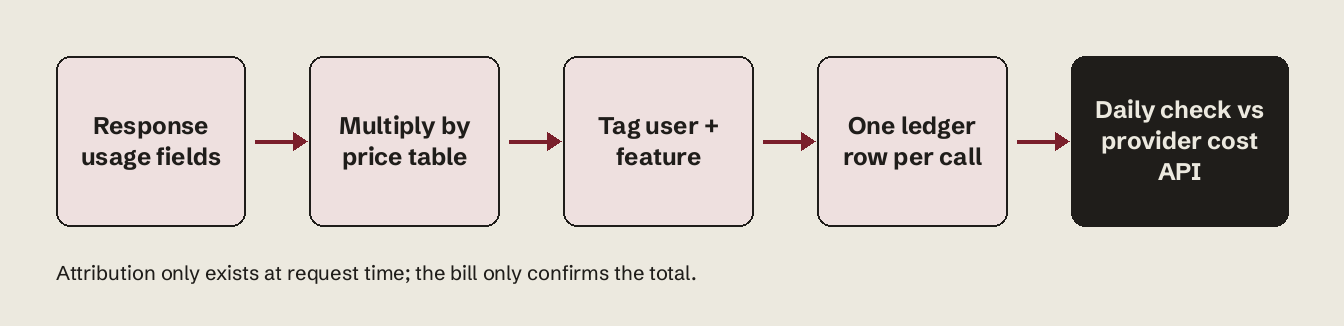
How do you track LLM API costs? You compute cost per request yourself, at the moment the response arrives, because that is the only point where you still know who made the call and why. Provider dashboards and billing APIs report by day, model, project or API key; they do not know that a call belonged to customer 4812 or to your "summarize ticket" feature. So the working setup has three parts: (1) a price table per model and token type, (2) a wrapper that multiplies the response's usage fields by that table and writes one row per call with your tags, and (3) a daily job that compares the sum of your rows with OpenAI's /organization/costs or Anthropic's /v1/organizations/cost_report. The rest of this guide builds each part, with the exact field names, as of 2026-11-21.
How does Vynaris track cost per request?
Vynaris is an OpenAI-compatible chat completions gateway at https://api.vynaris.com/v1. For cost tracking, what it gives you is a receipt on every response, so step 2 below (the price table) is not your problem:
- The response body includes a
vynarisblock withrequest_id,requested_model,served_model,cost_usdanddirect_equivalent_usd. - The same facts come back as headers:
x-vynaris-request-id,x-vynaris-served-model,x-vynaris-cost-usd,x-vynaris-baseline-usd,x-vynaris-saved. GET /v1/usagereturns your balance and aggregate usage;GET /v1/ledgerreturns per-request history (request id, requested and served model, cost, direct-equivalent cost).- Billing is provider list price plus 3% on the first $500 of monthly usage, then 1%, with a per-request receipt and CSV ledger. There are no overages: requests stop when the balance reaches zero (Vynaris pricing, read 2026-11-21).
What it does not do: it does not tag requests with your user or feature for you. You still log x-vynaris-request-id next to your own tags (step 3), then join against the ledger. And its native Anthropic /v1/messages format is not implemented yet, so Anthropic-shaped traffic goes through /v1/chat/completions (Vynaris docs).
from openai import OpenAI

client = OpenAI(base_url="https://api.vynaris.com/v1", api_key="vyn_sk_live_XXXX")
raw = client.chat.completions.with_raw_response.create(
    model="auto",
    messages=[{"role": "user", "content": "Summarize this ticket: ..."}],
)
cost_usd = float(raw.headers["x-vynaris-cost-usd"])
request_id = raw.headers["x-vynaris-request-id"]
resp = raw.parse()
If you call providers directly, here is the full do-it-yourself path.
What do you need before you start?
- A provider SDK that exposes the raw
usageobject (OpenAI Python/TS, Anthropic Python/TS). - A place to write one row per call: Postgres, ClickHouse, or a log pipeline you already query.
- For reconciliation: an OpenAI Admin key, and an Anthropic Admin API key (
sk-ant-admin01-...). Anthropic workspace keys do not work on the usage and cost endpoints (Anthropic docs).
How to track LLM API costs, step by step
Step 1. Read the right usage fields
Which usage fields include cached and reasoning tokens? Each provider splits them differently, and getting this wrong is the most common reason a home-made tracker drifts from the bill.
| Provider | Uncached input | Cache write | Cache read | Output | Reasoning |
|---|---|---|---|---|---|
| OpenAI (Responses API) | input_tokens minus cached_tokens | not billed separately | input_tokens_details.cached_tokens | output_tokens | output_tokens_details.reasoning_tokens, already inside output_tokens |
| Anthropic (Messages API) | input_tokens | cache_creation_input_tokens | cache_read_input_tokens | output_tokens | inside output_tokens |
Two traps hide in that table:
- OpenAI reasoning tokens are not visible in the answer, but they take context window space and are billed as output tokens. In OpenAI's own example,
output_tokensis 1,186 of which 1,024 are reasoning, andtotal_tokensis 1,261 (75 input + 1,186 output) (OpenAI reasoning guide). Countoutput_tokensonce; never addreasoning_tokenson top. - Anthropic reports input in three disjoint buckets:
total_input_tokens = cache_read_input_tokens + cache_creation_input_tokens + input_tokens(Anthropic prompt caching). Price onlyinput_tokensat the base rate.
Step 2. How do you price each token type?
Store prices per million tokens for every token type you read in step 1. Anthropic's multipliers are fixed: a 5-minute cache write costs 1.25x base input, a 1-hour write 2x, a cache read 0.1x. For Claude Sonnet 5.5 that is $2 input, $10 output, $2.50 5-minute write, $4 1-hour write and $0.10 cache hits per million tokens (Claude pricing, read 2026-11-21).
# USD per 1M tokens, read from the provider pricing page on 2026-11-21
PRICES = {
    "claude-sonnet-5-5": {"input": 2.00, "cache_write_5m": 2.50, "cache_read": 0.10, "output": 10.00},
}

def anthropic_cost(model: str, usage) -> float:
    p = PRICES[model]
    return (
        usage.input_tokens * p["input"]
        + usage.cache_creation_input_tokens * p["cache_write_5m"]
        + usage.cache_read_input_tokens * p["cache_read"]
        + usage.output_tokens * p["output"]
    ) / 1_000_000
Version the table with a date column. When a price changes, old rows must keep the price they were billed at. Langfuse works the same way: an updated price only applies to generations ingested after the update (Langfuse docs).
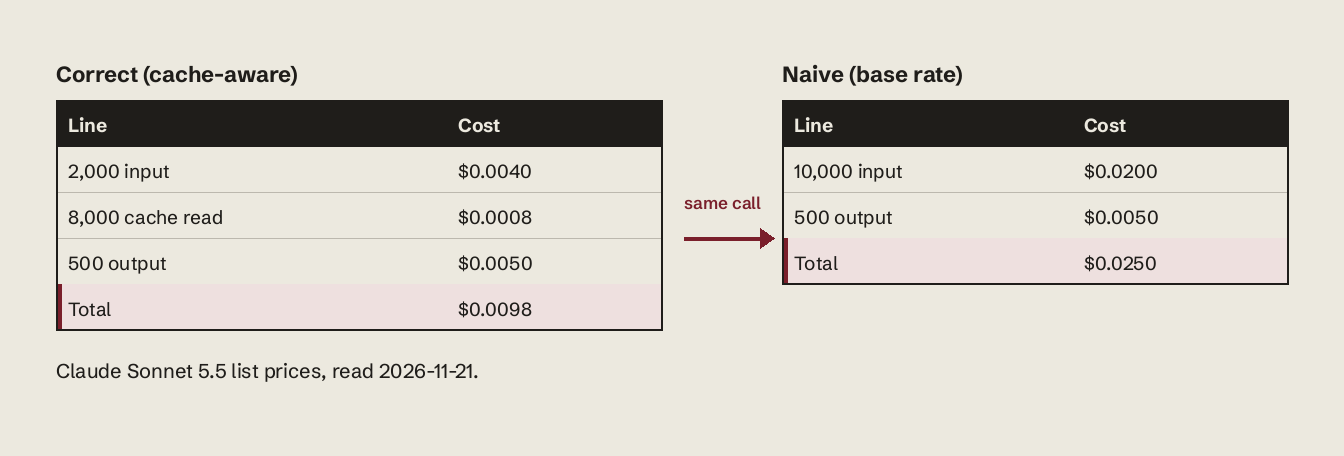
Worked example, one Claude Sonnet 5.5 call with a cached system prompt: 2,000 uncached input tokens, 8,000 cache-read tokens, 500 output tokens.
| Line | Tokens | Rate per 1M | Cost |
|---|---|---|---|
| Uncached input | 2,000 | $2.00 | $0.0040 |
| Cache read | 8,000 | $0.10 | $0.0008 |
| Output | 500 | $10.00 | $0.0050 |
| Total | 10,500 | $0.0098 |
A tracker that prices all 10,000 input tokens at the base rate reports $0.0250 for the same call ($0.0200 input + $0.0050 output), 2.55x the real figure. If you want to sanity-check rates like these across models, our LLM cost calculator does the multiplication for any model pair.
Step 3. Tag every call with user and feature
How do you attribute cost to users or features? Wrap the client once and require the tags as arguments, so no call can be made without them:
import time, uuid

def tracked_call(client, model, messages, *, user_id: str, feature: str, **kw):
    t0 = time.time()
    resp = client.messages.create(model=model, messages=messages, **kw)
    row = {
        "id": str(uuid.uuid4()),
        "ts": t0,
        "provider_request_id": resp.id,
        "model": model,
        "user_id": user_id,
        "feature": feature,
        "input_tokens": resp.usage.input_tokens,
        "cache_write_tokens": resp.usage.cache_creation_input_tokens,
        "cache_read_tokens": resp.usage.cache_read_input_tokens,
        "output_tokens": resp.usage.output_tokens,
        "cost_usd": anthropic_cost(model, resp.usage),
        "latency_s": time.time() - t0,
    }
    write_row(row)  # your DB insert
    return resp
Then cost per user or feature is one query:
SELECT feature, user_id, COUNT(*) AS calls, SUM(cost_usd) AS usd
FROM llm_calls
WHERE ts >= now() - interval '30 days'
GROUP BY feature, user_id
ORDER BY usd DESC
LIMIT 20;
On OpenAI you can also attach up to 16 key-value pairs as metadata on the request (OpenAI API reference). Keep your own row anyway: it is the record you can query and join.
Step 4. How do you split cost by project or API key?
Coarse attribution is free if you set it up in the console. OpenAI's cost endpoint groups by project_id, api_key_id and line_item; Anthropic's usage report filters and groups by API key, workspace, model and service tier. One project or workspace per product, and one key per environment, gives you a provider-side split that matches your own rows (OpenAI usage API).
Step 5. Reconcile against the provider bill daily
How do you reconcile with the provider's bill? Pull yesterday's cost from the provider and compare it with the sum of your rows for the same model and day.
# OpenAI: daily costs, grouped by project (Admin key)
curl "https://api.openai.com/v1/organization/costs?start_time=1763596800&bucket_width=1d&group_by=project_id" \
  -H "Authorization: Bearer $OPENAI_ADMIN_KEY"

# Anthropic: cost report (USD, decimal strings in cents)
curl "https://api.anthropic.com/v1/organizations/cost_report?starting_at=2026-11-20T00:00:00Z&group_by[]=description" \
  -H "x-api-key: $ANTHROPIC_ADMIN_KEY" -H "anthropic-version: 2023-06-01"
Anthropic reports costs as decimal strings in cents, so divide by 100 before comparing with your USD rows, and its cost endpoint leaves out Priority Tier, which you track through the usage endpoint instead (Anthropic docs). Anthropic now labels this API legacy and recommends the Usage and Cost Analytics API for new integrations. A gap under 1-2% is rounding and timing; a bigger one means a token type or price is missing from your table.
Step 6. How do you get alerted before the invoice?
Put a daily budget per feature on top of your table and alert at 80%. On Vynaris the hard stop is built in: requests stop when the balance reaches zero, with no overage charges.
How do you verify it worked?
- Send one call with a known cached prefix twice. The second response should show a non-zero cache read (
cached_tokensorcache_read_input_tokens) and a lowercost_usdrow. - For an OpenAI reasoning model, check that your row's output tokens equal
output_tokens, notoutput_tokens + reasoning_tokens. - After 24 hours, run step 5. Your daily sum per model should be within 1-2% of the provider's figure.
Why does my tracker not match the bill?
- Costs 20-60% too high on cached workloads. You priced cached input at the base rate. Read the cache fields in step 1.
- Costs too high on reasoning models. You added
reasoning_tokenstooutput_tokens; they are already included. - Anthropic cost report returns 401/403. You used a workspace key. Use an Admin API key (
sk-ant-admin01-...). - Cache never hits on Anthropic. If both
cache_creation_input_tokensandcache_read_input_tokensare 0, the prompt was below the minimum cacheable length and was processed without caching, with no error. - Token counts jump after a model upgrade. Claude 4.7 and later use a tokenizer that produces about 30% more tokens for the same text, so compare cost per task, not tokens per request.
- US-pinned Claude traffic costs 10% more than your table.
inference_geo: "us"applies a 1.1x multiplier on Claude 4.6 and later.
Build it, buy an observability tool, or use a gateway?
| Option | Cost per request computed by | Per-user tags | Price table upkeep |
|---|---|---|---|
| Vynaris | Gateway, returned in body and headers | Your log, joined on request id | None |
| DIY wrapper (this guide) | Your code | Yes | Yours |
| Langfuse | Inferred from usage x model definition | Yes, on traces | Shipped defaults, custom models yours |
| Provider cost APIs | Provider | No, project/key level only | None |
Choose the wrapper when you call one or two providers and want full control. Choose an observability tool when you also need traces and evals. Choose Vynaris when you want the cost on every response without maintaining prices, and a fee that drops from 3% to 1% after $500 a month. For a wider look at gateway fees, see our LLM gateway explainer and the LLM API cost spreadsheet template; for how cache reads come to dominate agent bills, see cache reads dominate agent costs.
FAQ
Is the OpenAI dashboard enough to track LLM costs?
For one team on one project, often yes. It stops at project and API key, so once finance asks for cost per customer or per feature, you need per-request rows.
Can I estimate cost from the prompt text instead of usage fields?
Not reliably. Langfuse warns that text-based token estimates can produce incorrect costs for thinking models and cached-token pricing, because neither reasoning nor cache hits are visible in the text.
How often do LLM prices change?
Often enough that a hard-coded table goes stale within months. Keep a dated price table and re-read provider pricing pages on a schedule; our cost per token over time post tracks the drift.
Do LLM gateways add cost to track usage?
Usually a fee. Vynaris charges 3% on the first $500 of monthly usage and 1% after, on top of provider list price; self-hosted LiteLLM is $0 in software but you run the servers.
Want the receipt without the bookkeeping? Swap your base URL to https://api.vynaris.com/v1 and every response tells you what it cost. See Vynaris pricing.Related articles
- What a Cursor-style tab-completion feature costs per user per month
- Anthropic's new tokenizer: same sticker, ~30% more tokens per request
- How to attribute a multi-agent LLM bill: cost per agent, per task, and per user without double-counting
- What a chat-with-your-PDF SaaS pays per active user: a cost model from public pricing
- What an AI PR-review bot costs per pull request: the 59x model spread and the re-review tax